By Raghavendra Prasad Meeniga | Vice President of Technology
AI agents are evolving from tools that simply answer questions into applications capable of interacting with external services, accessing data, and completing approved tasks.
Connecting these AI applications to cloud object storage has traditionally required custom code, API integrations, credential configuration, and ongoing maintenance.
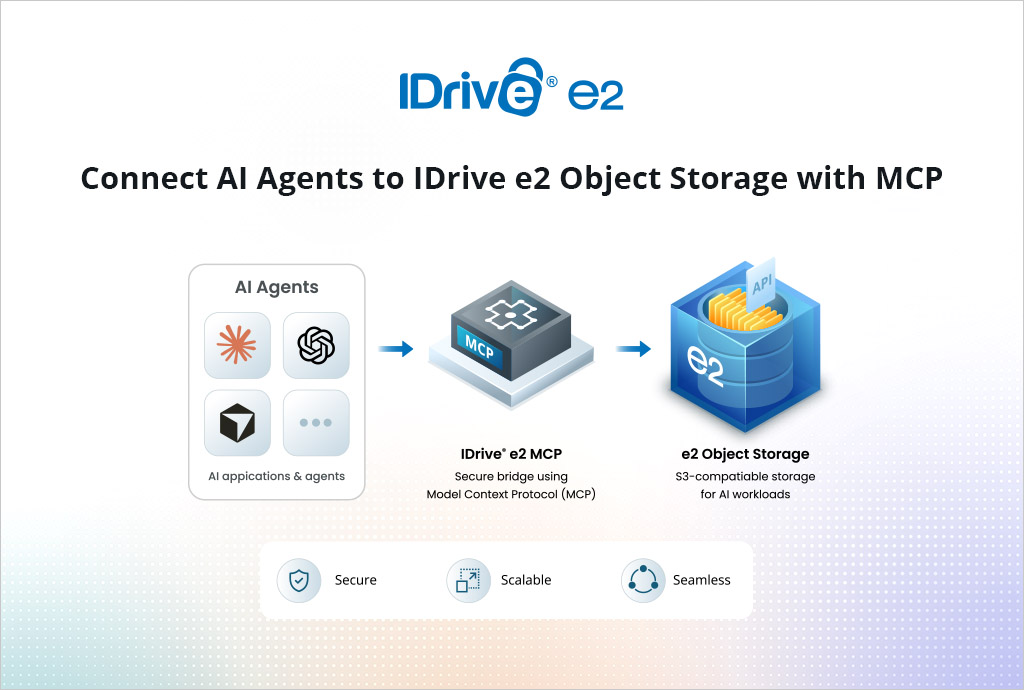
IDrive® e2 MCP simplifies this process by providing AI agents with secure, standards-based access to IDrive e2 object storage.
Through a single MCP connection, compatible applications can interact with stored data and perform supported object and bucket operations using natural-language instructions.
What Is MCP?
Model Context Protocol, or MCP, is an open standard that enables AI applications to connect with external data sources, services, and tools.
Instead of developing a separate integration for every AI platform, MCP provides a common interface through which compatible applications can discover available capabilities and use them based on the permissions granted by the user.
With IDrive e2 MCP, those capabilities extend to S3-compatible object storage.
AI agents can securely access storage resources, perform supported operations, and return the results directly within the user’s conversation or development environment.
What IDrive e2 MCP Enables
IDrive e2 MCP allows compatible AI applications to perform a broad range of object- and bucket-related operations.
Users can work with stored objects by:
- Enabling secure file uploads and downloads through S3 pre-signed URLs
- Searching and listing objects across buckets
- Reviewing object metadata and versions
- Copying, restoring, and deleting objects
- Managing object tags, retention, and legal holds
- Generating temporary pre-signed URLs
- Managing multipart uploads
Users can also perform bucket-related operations, including:
- Listing, creating, and deleting buckets
- Reviewing and configuring versioning
- Managing lifecycle policies
- Configuring encryption and replication
- Managing bucket policies and tags
- Configuring logging and notifications
- Reviewing Object Lock and inventory settings
IDrive e2 MCP currently supports 65 read-only and read-write tools, providing broad coverage for common S3-compatible storage operations.
These capabilities allow AI agents to help users discover, organize, manage, and automate object-storage workflows without requiring them to manually perform every operation through a storage console, command-line interface, or custom script.
Secure OAuth-Based Authorization
IDrive e2 MCP uses OAuth-based authorization, allowing users to authorize an AI application without sharing their underlying IDrive e2 access keys.
During authorization, users can select the permissions required by the application and configure the session duration. Connected applications can also be reviewed or revoked from the IDrive e2 account.
This allows organizations to grant only the access needed for a particular workflow.
Read-only access can be used for searching objects, reviewing metadata, and inspecting bucket configurations. Read-write access can be reserved for applications that need to upload, modify, configure, or delete storage resources.
For sensitive or destructive operations, users can instruct the AI application to display the proposed changes and request confirmation before proceeding.
Use IDrive e2 with Claude, Cursor, ChatGPT, Grok, and Codex
IDrive e2 MCP can connect with MCP-compatible AI applications such as Claude, Cursor, ChatGPT, Grok, Codex, and other clients that support the protocol.
This allows developers and teams to access object storage from the AI-assisted tools and environments they already use.
Developers can manage build artifacts, application files, logs, and datasets from coding assistants. DevOps teams can inspect bucket configurations and manage storage operations. Data teams can locate and access stored content for AI and analytics workflows.
Because MCP is an open standard, organizations are not limited to a single AI platform or proprietary integration.
Configuration Guides For
No Custom Storage Integration Required
Without MCP, connecting an AI application to object storage may require developers to create API wrappers, define individual storage functions, implement authentication, and maintain separate integrations for different clients.
IDrive e2 MCP provides a standardized interface that compatible AI applications can connect to directly.
The AI application can discover the available tools and invoke the appropriate operations based on the user’s request and authorized permissions.
This reduces the development work needed to bring S3-compatible object storage into AI applications and agent-driven workflows.
Predictable Storage Costs
IDrive e2 MCP does not introduce an additional charge for using the MCP connection.
Users also benefit from IDrive e2’s straightforward object-storage pricing, with no egress fees, helping make costs more predictable for AI workflows that regularly access or process stored data.
This is especially useful for AI agents that may frequently list objects, inspect metadata, retrieve files, or perform storage-management operations.
Getting Started
Connecting an AI application to IDrive e2 MCP is straightforward:
- Add the IDrive e2 MCP connection to a compatible AI application.
- Sign in securely using an IDrive e2 account.
- Select the required permissions and session duration.
- Begin interacting with object storage using natural-language instructions.
IDrive e2 provides setup guidance to help users connect supported applications and begin working with their storage.
Bring AI and Object Storage Together
AI agents become more useful when they can securely interact with the systems where organizational data is stored.
IDrive e2 MCP provides a standardized way for compatible AI applications to access and manage S3-compatible object storage. Users can upload, download, search, organize, and manage objects, configure buckets, generate temporary access links, and automate routine storage operations without building a separate integration for every AI platform.
Connect your preferred MCP-compatible AI application to IDrive e2 and start working with object storage through natural language.